Nunchux
At a glance
- Role
- Design engineering intern
- Team
- Bosung Hwang
- Jun Yan
- Kuan Wang
- Timeline
- May to July 2026
- Platform
- Web
I designed Nunchux’s B2B platform 0→1: the place where teams discover generative models, test them, and ship them through the API.
Every screen started as a blank file, from onboarding and the Playground to analytics and billing. I also made its brand from scratch, built its design system, and designed and coded the marketing site.
The platform is shipped and live, and now powers $1M+ ARR.
Context
One platform and one API for 60+ generative models
Nunchux (formerly Nunchaku AI) builds the infrastructure that optimizes generative models, in the same space as fal and Together AI. Teams get image and video models like FLUX.2 and Kling through one platform and one API: 60+ models across 8 types, from text-to-image to multishot video and avatars.
The people using the dashboard are developers and product teams at other companies. They come in with a job to do: find the right model, see if it’s good enough, wire it into their product, and keep an eye on cost.
Problem
Customers had to message the team to change anything
When I joined there was nothing to redesign: no dashboard, no design system, no brand to build on. The team had the model infrastructure, but customers could only get set up or change a setting by messaging the team directly.
The tension
Someone exploring wants output fast. Someone integrating wants keys, logs, and numbers they can trust. Most platforms pick one and bolt on the other.
Two goals
Website: win customers at first glance
Show right away that Nunchux is high craft and serious about what it does.
Dashboard: let customers serve themselves
Everything they need without messaging us, plus proof, in their own numbers, of how much more effective Nunchux has made their work.
Home
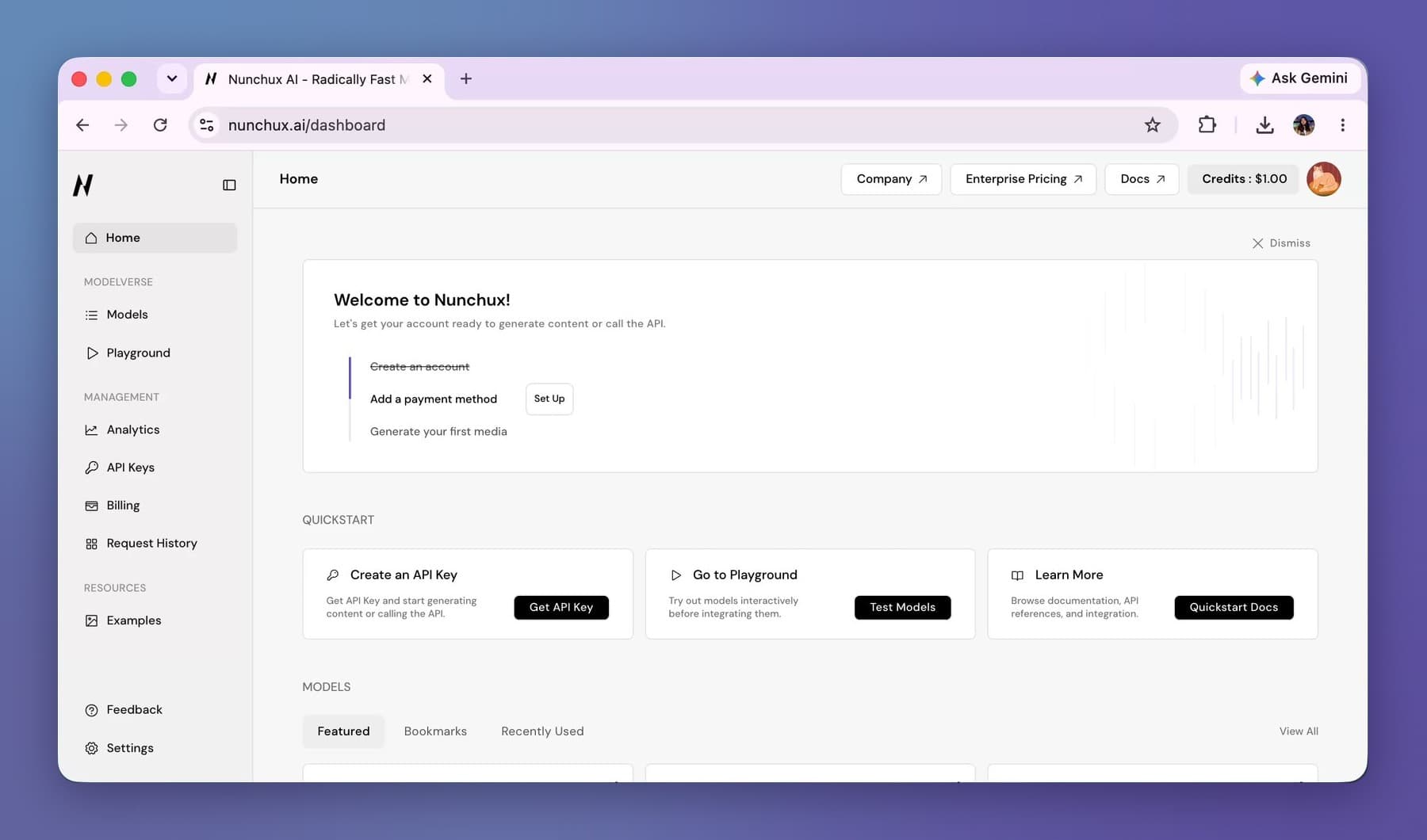
Home answers one question: what should I do next?
A three-step checklist (create an account, add a payment method, generate your first media) crosses steps off as you go and can be dismissed once you know your way around. It walks new teams to the two moments that turn a sign-up into a customer, topping up and trying a model, and gives them one clear path through a dashboard with a lot going on.
Quickstart cards split the paths right away
Get an API key if you’re here to build, open the Playground if you’re here to try, read the docs if you’re here to learn.
Home stays useful after onboarding
Models sit below the fold in Featured, Bookmarks, and Recently Used tabs, and the bottom carries research posts and a path to dedicated GPU endpoints for bigger teams. Each model card turns per-megapixel pricing into something you can picture, like about 15,800 images for $10.
Credits are always in the top bar
On a pay-per-use platform, cost should never be something people have to hunt for.
The sidebar follows the three jobs people arrive with
Modelverse, Developer, and Organization. A solo developer can ignore the admin tools until their team grows.
Playground
Complex inputs that feel simple, and a price you can see
The Playground is where teams decide if a model is worth integrating. It has its own nav (Create, API, Examples, Readme, Pricing, Library), so everything about one model lives in one place, including the code to call it once the output looks right.
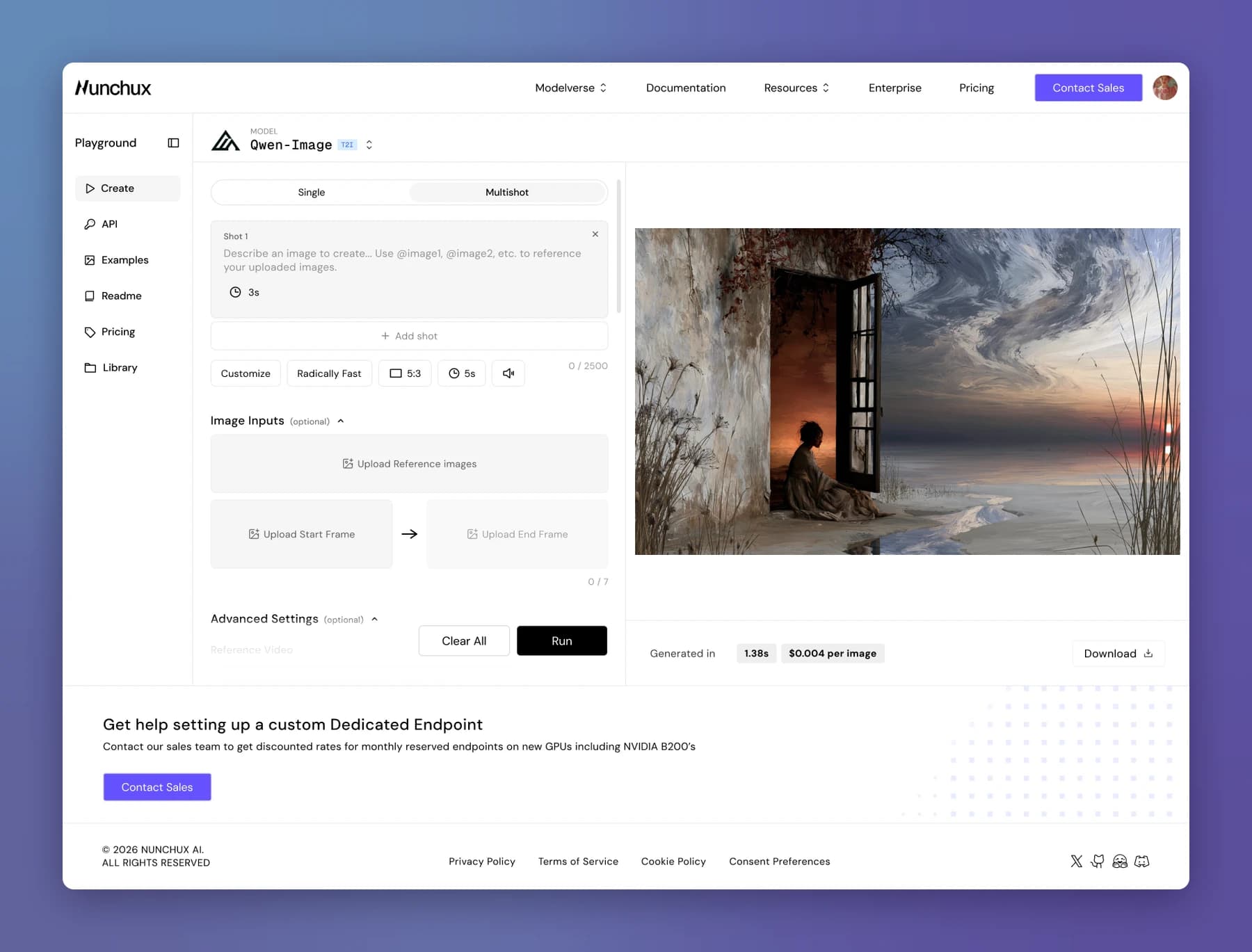
Image references live inside the prompt
Uploads become @Image chips with a tiny thumbnail, dropped right into the sentence, so you can see which image you mean instead of matching filenames in your head.
One input pattern for every model
Switching models keeps the same layout, and a type badge (T2I, I2I, OMNI) makes clear why the inputs on screen fit the model you picked.
Settings are chips
Quality, duration, and audio sit in one row under the prompt, with Single and Multishot as a toggle at the top.
Limits show before anything fails
Character count, file types, size limit, and image slots used (4 of 7) are visible upfront.
The price sits next to the result
Every output shows its per-second price and where it ran, so testing a model doubles as estimating what it will cost.
Kling V3 Omni
The most complex model, in the same Playground as every other
Kling V3 Omni was the hardest model to bring onto the platform: Single and Multishot modes, a stack of image references, several shots in one generation, plus duration, quality, and audio.
My first explorations put all of it on screen at once. The mode sat in a row of tabs beside Auto and Customize. Every shot had its own 3s duration while a 5s chip under the prompt set another, so the screen showed two durations that disagreed. References lived in an upload box, and to use one you had to remember to type @image1. One version printed “@Image 1” on the thumbnail, but the link between picture and sentence still lived in your head.
Each round removed one of those doubts. The mode became a single Single/Multishot toggle. Duration moved into each shot, so there’s one number to trust. References moved into the prompt as chips with a thumbnail, so you see which image a sentence points to. The chips under the prompt kept only what applies to every shot.
Multishot turns the prompt into a stack of shot cards
Each shot has its own prompt (up to 512 characters) and its own duration (3 to 10 seconds). Counters like 3 of 6 shots and 11 of 30 seconds show the limits before they bite.
References are shared across every shot
So the same character and the same cat stay consistent from shot to shot.
Rare inputs sit lower down
An end frame and images from a URL sit below the prompt, and Advanced Settings stay collapsed until you need them.
Explorations
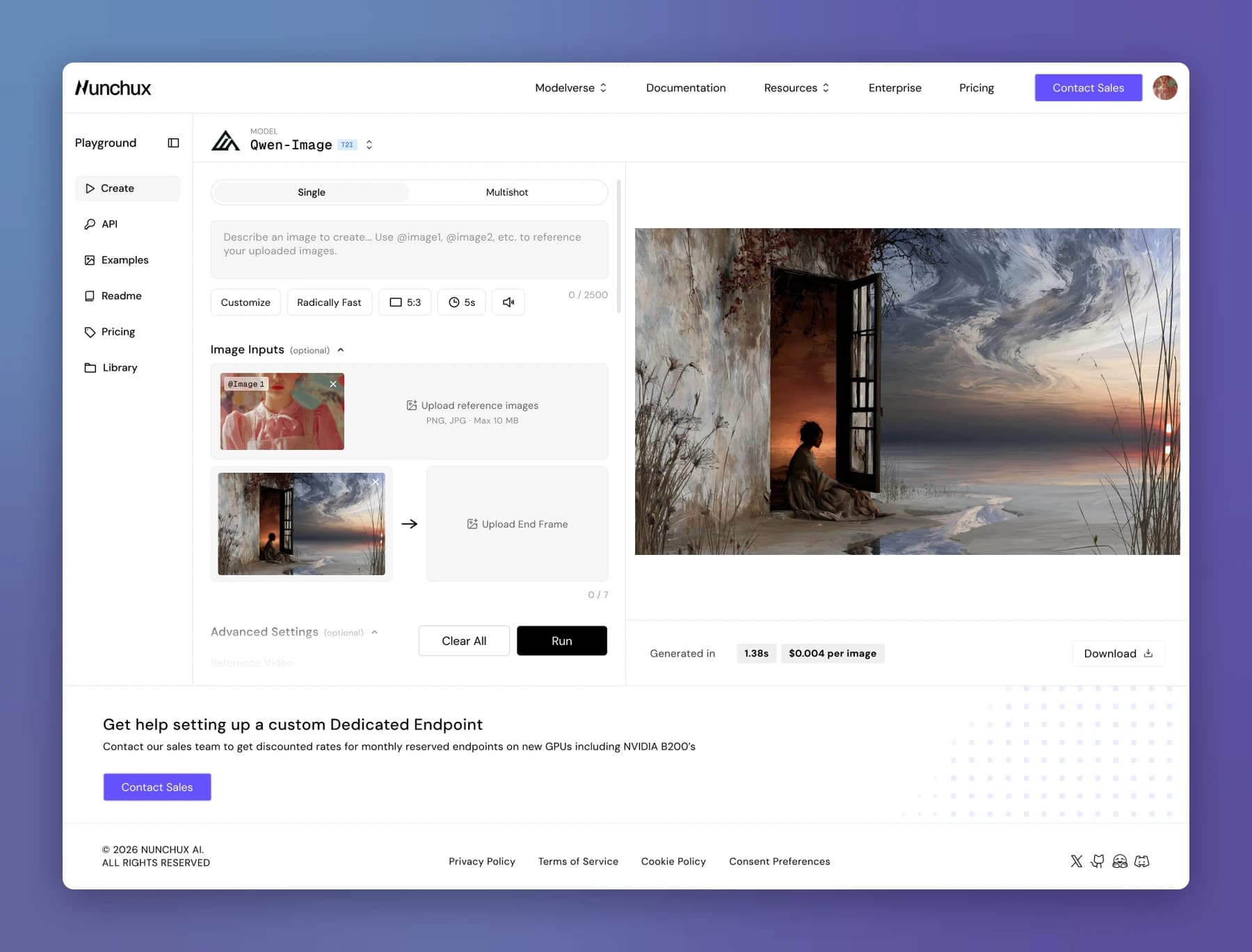
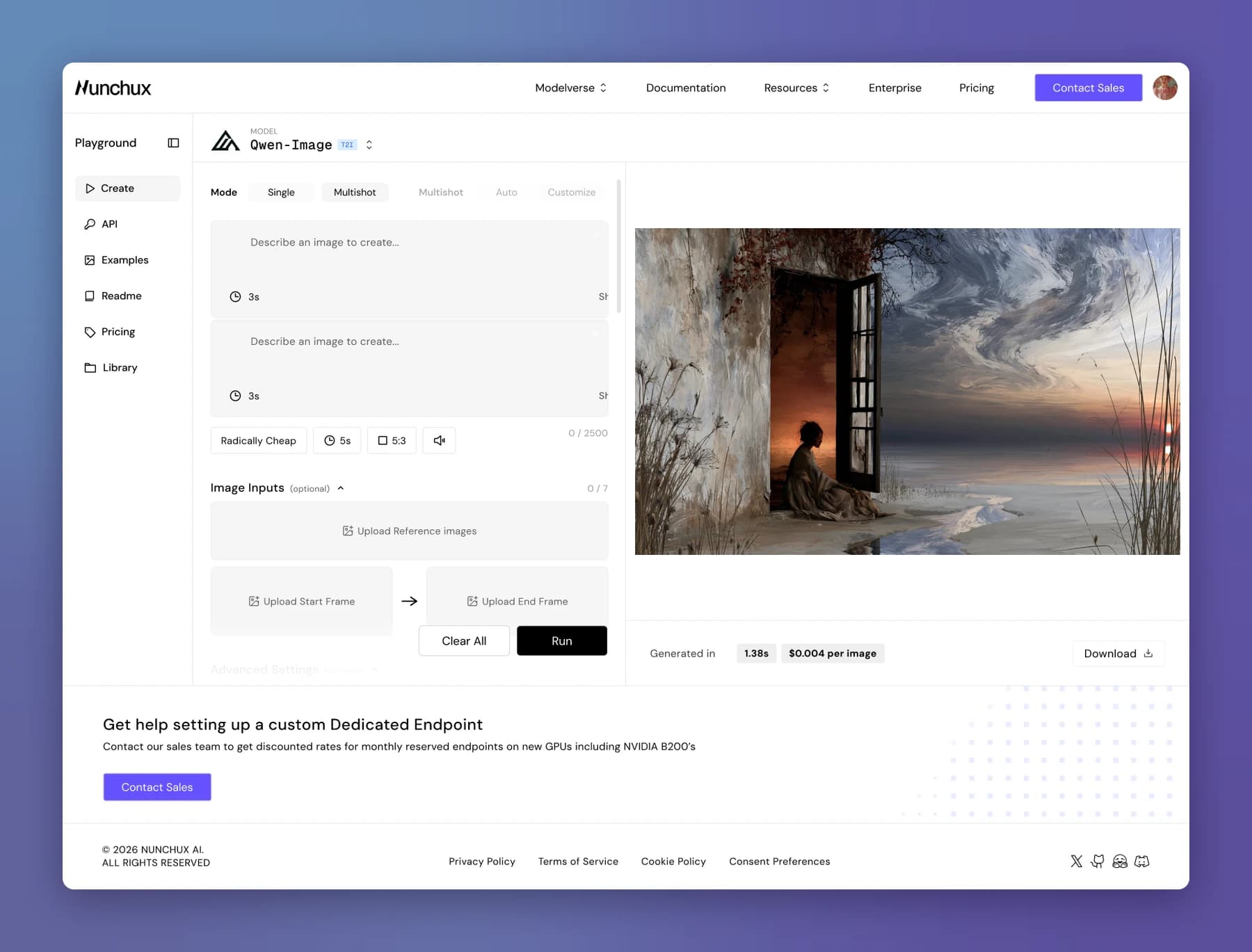
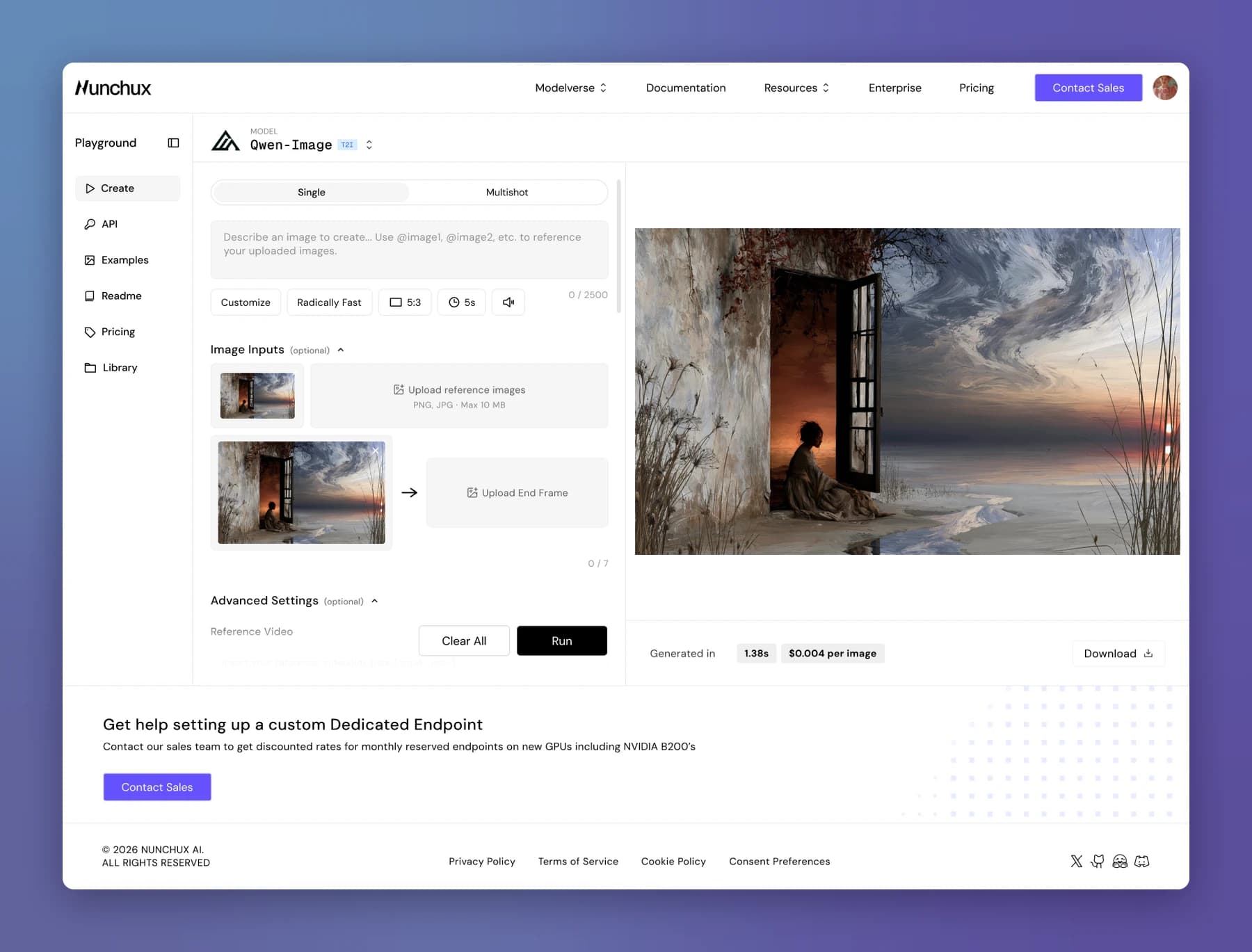
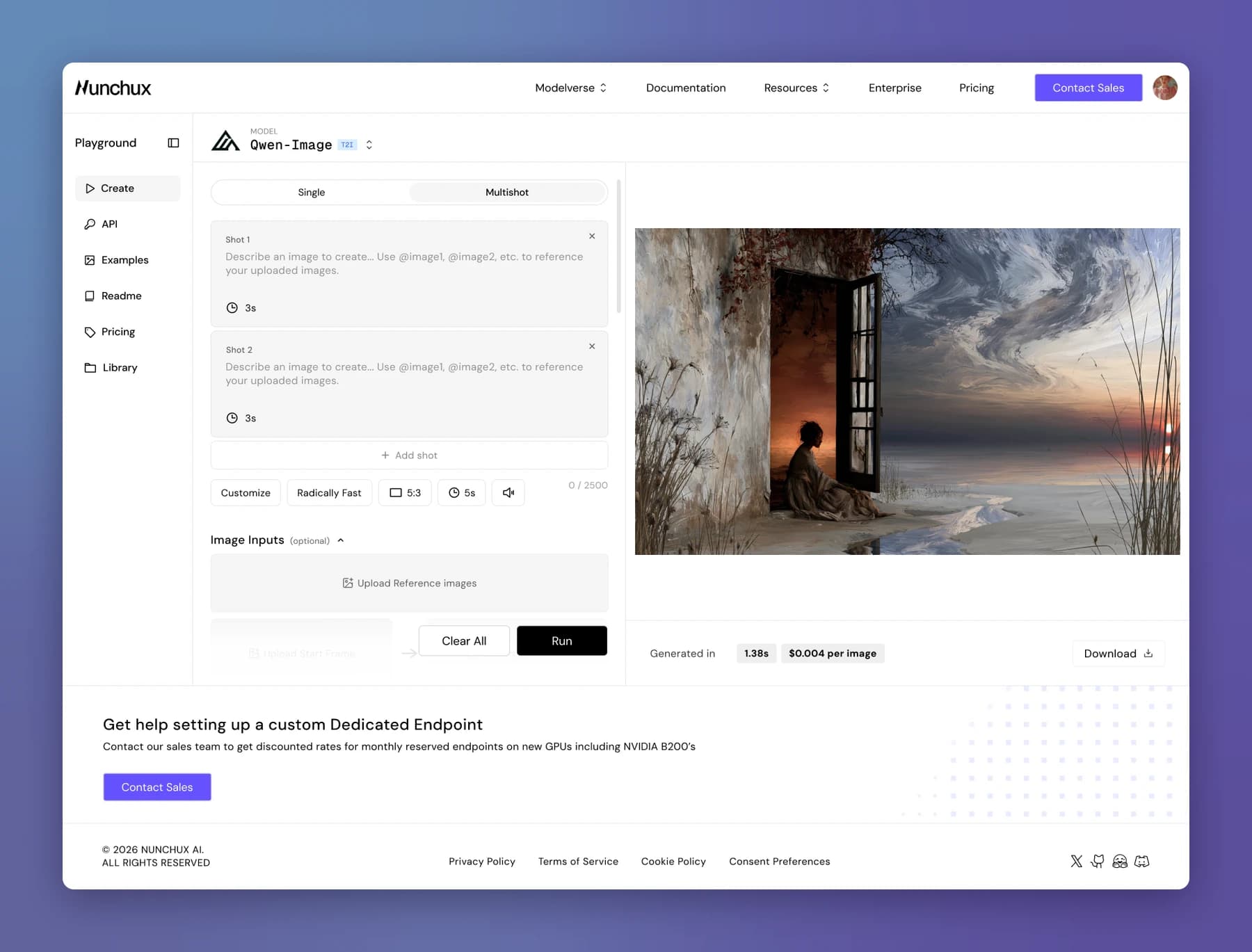
Frame 1 of 5: Kling V3 Omni in the Playground, exploration 1 of 5
Exploration 1 Multishot as a toggle, with a 3s shot card, but a 5s chip under the prompt sets a second duration. References sit in an upload box you call by typing @image1.
Developer tools
Numbers developers can trust
Once a team is building, the dashboard shifts from exploring to monitoring. Analytics also had a bigger job: showing customers, in their own numbers, how much more effective Nunchux has made their work.
Three tabs for the three morning checks
Usage, Performance, and Errors: am I spending, is it fast, is anything broken. Performance shows P50 to P99 latency, and Errors splits success into server, client, and total, with a count for every status code from 400 to 503.
Spend split by source
Total Usage breaks into Playground and API Key, so teams can tell testing costs apart from production costs.
Context around every number
Monthly usage against last month, a date range, and breakdowns by model and by API key.
The receipts behind the charts
Request History filters every call by status, model, tier, member, latency, date, and timezone. Open any output and glide straight through the rest, instead of clicking out to hunt for the next request. API Keys shows how many of the 10 allowed keys are in use.
The key move
Model latency sits next to total latency everywhere, so customers see how fast the model itself ran on Nunchux: the proof of value analytics was built to show.
Request History
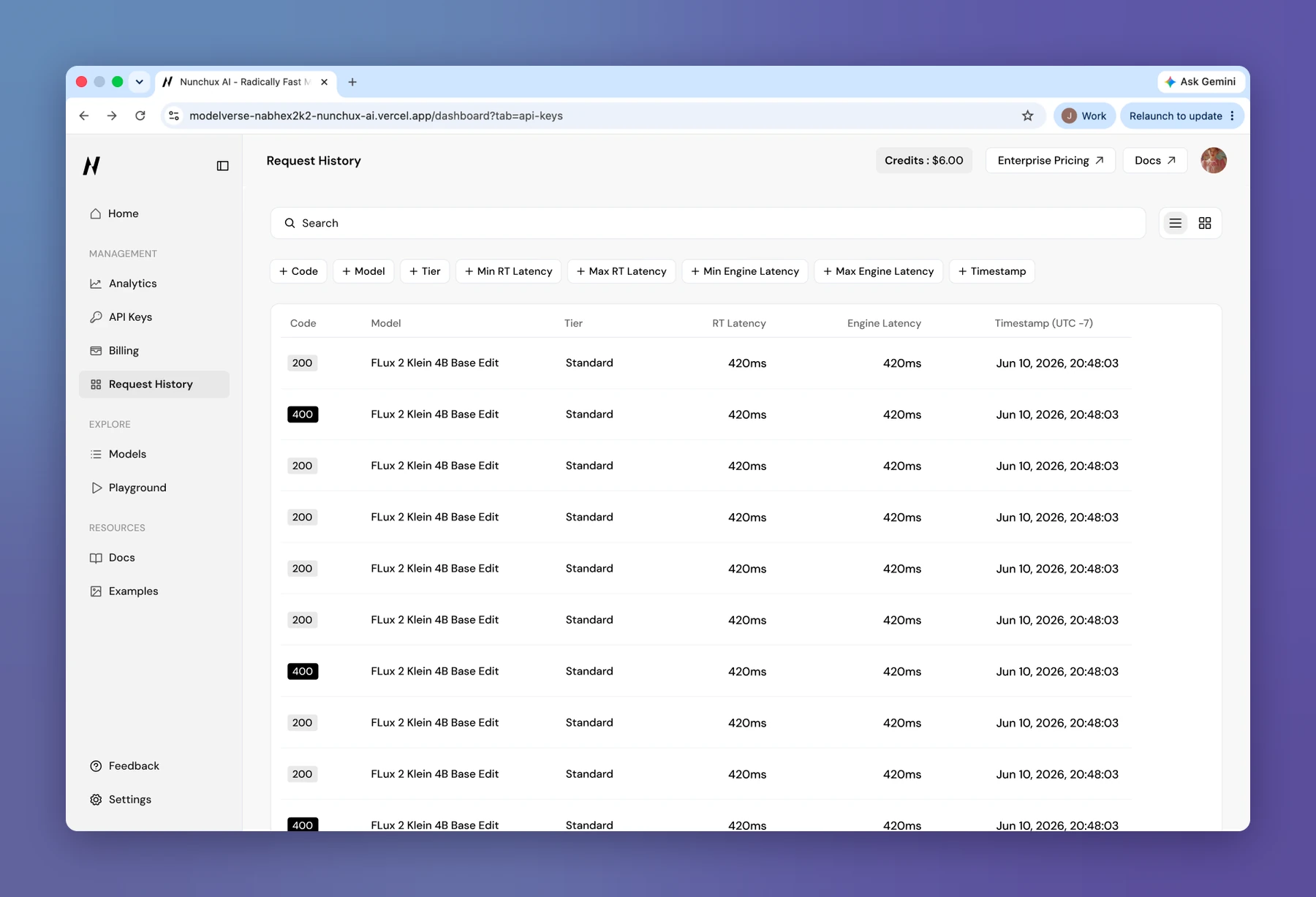
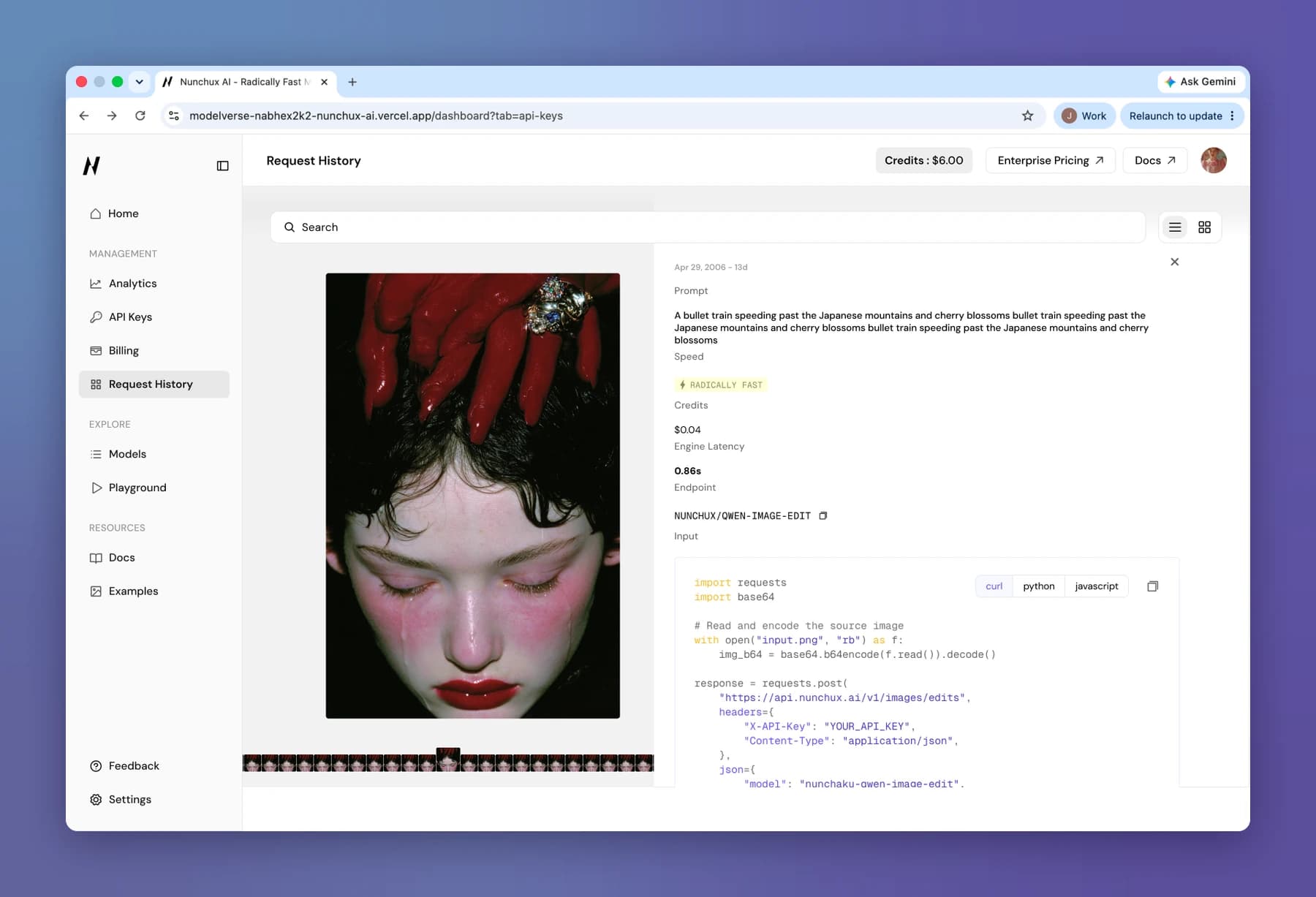
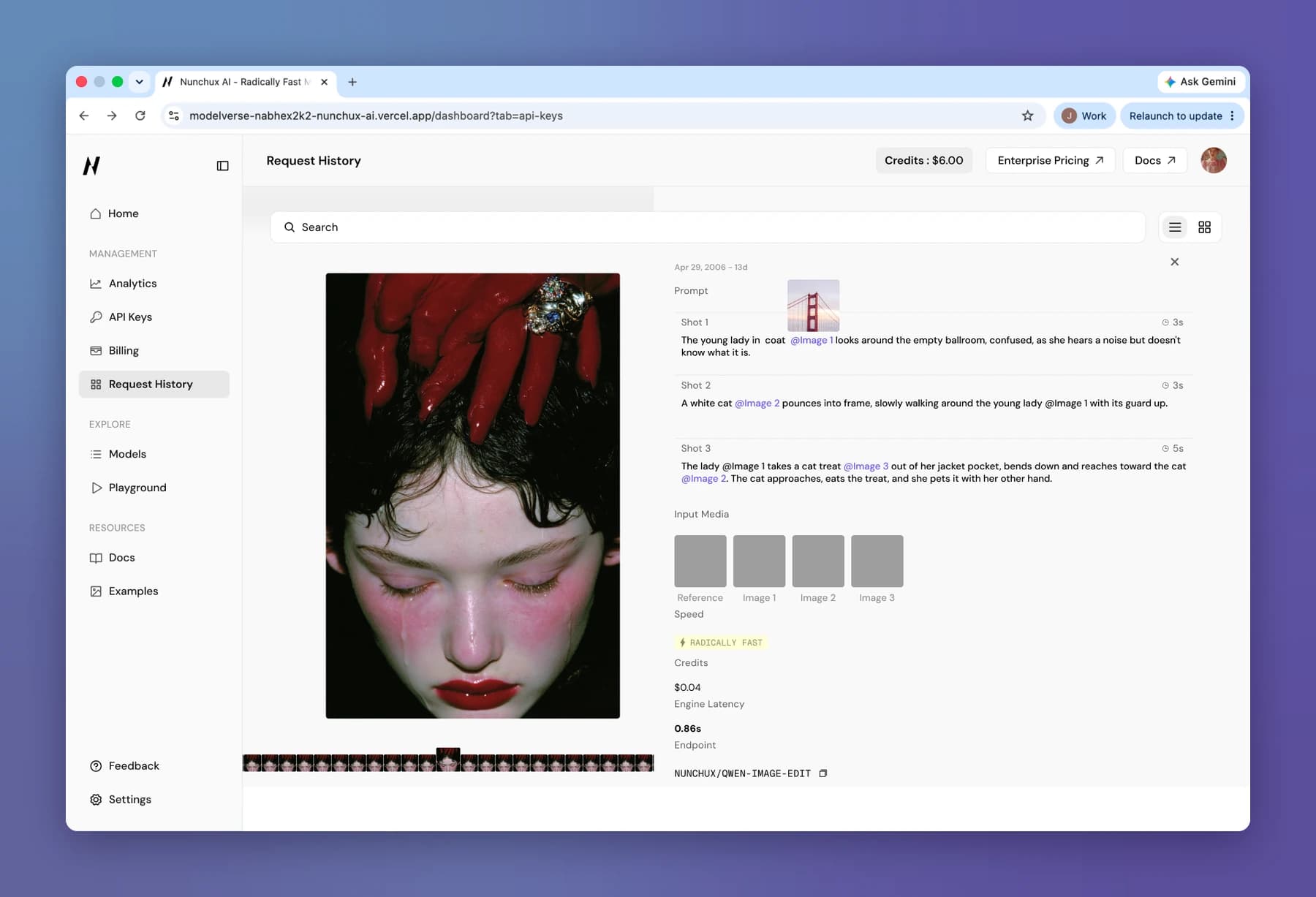
Frame 1 of 3: Request History: every call in a table with its status code, model, tier, latencies, and timestamp
Brand and design system
One brand from the first visit to the dashboard
Nunchux had no logo, so I made its brand and built its design system from scratch, so the marketing site and the product feel like one company. The system covers both, with 1,000+ component variants.
Quiet surfaces, loud content
A near-monochrome UI with black primary buttons lets the generated images and videos be the color on the page.
Monospace for machine things
Model names, @Image references, and type badges use a mono face, so anything you might copy into code reads as code.
Color-coded model types
T2I, I2I, and OMNI badges each get their own tint, so a grid of models scans by capability at a glance.

A tiny detail I love. Developer dashboards usually hand you a gray circle with your initial in it. I wanted the first thing you personalize on Nunchux to show what Nunchux can do. So every avatar you can pick is from a set we generated ourselves, with our models on our infrastructure. Before you write a single line of code, you’ve already held something the platform made.
Landing page
If we can show it, we don’t say it
Nunchux sells image and video models, so a wall of text was the fastest way to lose people. Visuals carry the story, and small interactions give people a reason to keep scrolling.
A before and after you can watch
The same workload runs side by side: without Nunchux, generations time out and fail; with it, they finish in 0.08s with no errors. The difference is something you watch, not a number you read.
Hover to play
Model showcases come alive as you hover, so visitors browse real outputs instead of static thumbnails.
I designed and built the site myself in React and Next.js, and it went live during my internship. Owning it from Figma to production meant the site and the dashboard share one visual language, so someone who signs up lands somewhere that already feels familiar.
Outcome
Live, and powering $1M+ ARR
On the dashboard, I coded part of the front end and the engineers built the rest from my designs. The product couldn’t be shown outside the company before launch, so we tested internally with the whole team.
The website brought in 2,000+ signups and 5+ business customers within 3 months, and the platform launched right after.
- ARR the platform now powers
- $1M+
- Signups in the first 3 months
- 2,000+
- Business customers onboarded through the site
- 5+
- Retained users
- 300+
- Website visits in the first 3 months
- 20K+
- Page views
- 60K+
- Models in the Playground
- 20+
Reflection
How much one designer can shape a company when they’re trusted with the whole thing.
Nunchux was a seed-stage startup in stealth when I joined, and I got to watch it launch. There was no PM, so I worked directly with engineers and owned my whole area, from what to design next to what shipped.
Start from the business goal, then question every screen
With no roadmap, I started each design from what it had to do for the business: the checklist exists because topping up and trying a model turn a sign-up into a customer. Then I asked of every control: who needs this, how often, and what breaks if we hide it? That’s how Kling V3 Omni became one toggle, a row of chips, and a collapsed Advanced Settings.
Make confident calls with less data
In stealth, the product couldn’t leave the building, so every round of testing was with the team. I explained the reasoning behind each decision so engineers could push back, and shipped knowing real customers would teach us more after launch.
Bring engineers the why, not just the screen
Building the website and parts of the dashboard myself taught me what a design costs to build, so I can tell a team which details are worth the extra week and which aren’t.